

Relive-An Online News Platform
Client
Relive (Fictional)
Role
UI Designer
Team
UX Researcher,UX Designer
Timeline
Background
Relive's online platform connects readers worldwide with news,job ads, vacations, and discounts.Users can personalize their content, but the onboarding process confusion impacted subscription numbers
Challenge
Relive delivers personalized news to users, but the distinction between marketing emails, newsletter emails, and paid content subscriptions remains unclear to them.
Solution
May-June 2022
Onboarding process clarifies subscription differences, allowing users to easily opt-in/out of emails and newsletters.
EMPATHIZE
Research Goal
To investigate user perceptions, preferences, and pain points regarding the onboarding process and subscription options in order to identify areas for improvement and inform the design of a more user-friendly and effective experience.
Research Objective
-
Identify the specific challenges or confusion users face during the onboarding and subscription process.
-
Explore user preferences and expectations regarding email communication, personalized content, and subscription management.
-
Determine the factors that influence users' decision to subscribe or unsubscribe from paid content.
Research Methodology
-
Competitive Analysis
We each analyzed three different new applications (Six total) and tried to glean from what they did well and what they did poorly so that we could redesign this product with our users in mind.
Click here for the summary of competitive analysis

Research Findings
1
Personalize
Users need a personalized news platform that delivers true investigative news, provides necessary resources, and caters to their lifestyle.
2
Quick Access
Users need to know easily and quickly the services offered by a news outlet so that they can choose one that meets their lifestyle/goals.
3
Benefit Of the Subscription Plan
Users can clearly understand are benefits of a subscription plan and its different from a newsletter and marketing email.
DEFINE
Persona
Since refining the user experience for an app that already exists, we already have user personas to work with. Relive appeals to a large audience and a wide variety of users engage with this app. Here are some of the user personas that we should use to inform the design.
 |  |  |
|---|
Refining the UX Solution
To further develop and refine the UX solution, I conducted brainstorming sessions with team and utilized the Crazy 8 technique. These activities allowed me to generate a wide range of design ideas and explore different possibilities.
-
Brainstroming session
The goal of this session is to Iterate as many ideas as possible, quality over quantity, and settle on a few viable solutions. We completed two ‘Sticky Note’ sessions on Miro to generate possible solutions to help users during their Relive onboarding experience. Check out a full version here

-
Crazy 8 session
Designed a user-centric homepage that seamlessly showcases preferred news while building trust, and assisting time-constrained users in efficiently accessing and reading articles/newsletters.

Outcome
After the brainstorming and Crazy 8 sessions, we identified key areas to focus on:
-
Onboarding screens
-
Homepage
-
Subscription page
-
Signup page
These areas were chosen based on their potential to effectively solve our users' problems and provide a seamless user experience.
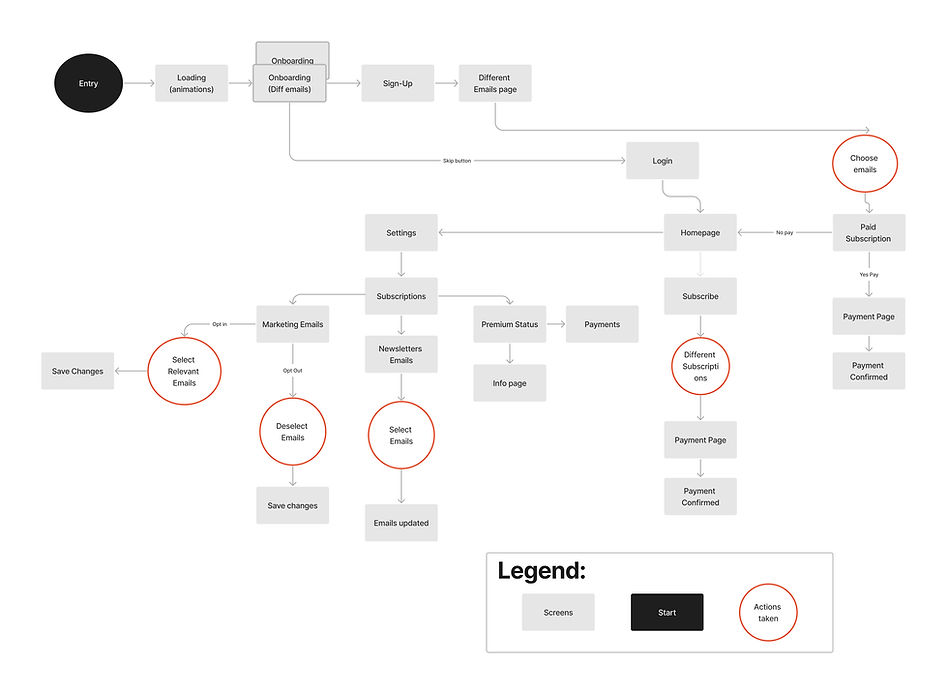
User flow
I created a user flow to determine how a user would complete a task.
.jpg)
DESIGN
Design system
I integrated the typography and color palette provided by the customer into the design system. Expanding upon the design system, I incorporated buttons and icons. This approach not only satisfied the client's requirements but also allowed for streamlined design and development processes.

Mid to high-fidelity wireframe
The UX designer and I communicated about all other features to design based on the research, competitive analysis, and the needs of the stakeholders. We agreed on the following designs.

TEST
Usability testing
Once the mid-to high-fidelity prototype looked close to a finished product, I tested the designs. This helped to validate and/or invalidate the solutions generated earlier from the ideate phase.
Usability study parameters
-
Users were asked to complete the following Direct tasks
-
Sign up as a new user
-
Opt in/Out of a newsletter
-
Look at an article
-
View different subscription plans
-
Go home

Usability study finding
During the usability testing phase, I collected valuable feedback from participants that shed light on areas of improvement in the design. To summarize the findings, I focused on items that required attention based on participant feedback. This quick and easy synthesis of usability test findings allowed me to identify key areas for improvement and make informed design decisions in the project.
View the full spreadsheet here.

Outcome
-
The opt-in/out of a newsletter was not clear
-
Audio button was not intuitive
-
The home icon not working from settings
-
Subscription plans had too much scrolling
ITERATE
In the first design, users didn't like swiping to tell the difference between Newsletters and Emails during onboarding. In the new design, they can see all the email subscription benefits without swiping.


Before
After
The initial design made it unclear how to opt in/out of the newsletter, but after a usability study,I redesigned the setting screen for easier user navigation.

.png)
Before
After
Users found the purpose of the volume button unclear and expressed a preference for using the play button instead to listen to an article.
.png)
Before
After
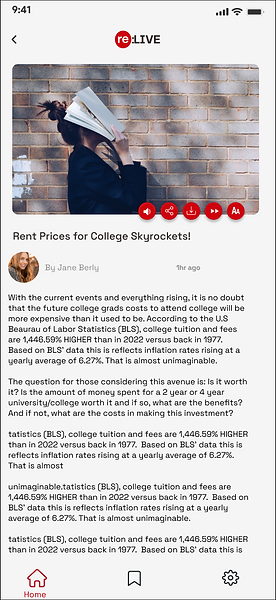
From the usability studies, I derived some actionable insights, one of which involved creating a subscription plan screen form. This allowed users to easily distinguish between different subscription plans.
.png)
Before
After


WHAT I LEARNED
Due to time constraints inherent in sprints, conducting additional usability testing wasn't possible. However, it would greatly benefit the success of the app by ensuring a more user-centric approach in the future. I aim to interview more Relive users directly, listening, observing, and understanding their concerns to gain a deeper insight into the users behind the product.
Throughout this process, I discovered that effective communication is crucial for delivering the product on time, fostering collaboration, and organizing content and designs in an accessible manner. Learning and supporting each other emerged as key elements for the success of our collaborative project.
In conclusion, ideas remain just ideas until they undergo testing. Therefore, holding on to them loosely will allow even better ideas to surface for users.
