
Orcasound SMS Notifications
Orcasound is a non-profit organization focused on tracking and protecting orcas. I designed an SMS notification system to deliver timely alerts directly to users’ phones, creating a simple and human-centered experience.


My Role
-
UX Researcher
-
UI Design
Team
-
UX Manager
-
Product Manager
-
UX Designer
Timeline
August-December 2023
Tools
-
Figma
-
Figjam
-
Canva
-
Slack
-
Google Doc
The Story Begins
Need for change
Imagine standing by the shore, the salty breeze in your hair, waiting for the moment when an orca breaches the surface. For marine enthusiasts, conservationists, and curious minds alike, every whale sighting is a magical experience. But what if you miss it?
OrcaSound, a platform dedicated to listening to live orca calls, faced a challenge: users weren’t receiving real-time alerts about whale activity. Emails arrived too late, and social media posts got lost in endless feeds. By the time users saw the update, the whales were gone.
Orcasound's challenge was clear: they needed a system that could deliver real-time notifications directly to users’ phones—something more immediate and actionable than emails or social media updates.
How could we bridge this gap and bring users closer to the ocean, at the right time?
The Problem
Overwhelmed by Information
Orcasound was struggling with an overload of information. The community was overwhelmed by the sheer volume of emails, and social media posts weren’t always being seen by the right people at the right time. This was especially critical when it came to orca sightings and environmental risks, where every second counted. People were missing vital alerts, or worse—taking too long to respond.
I knew I needed to design a solution that could cut through the noise and deliver information immediately, ensuring that users could act when needed. But how could I do this while keeping things simple and user-friendly?
The Research Journey
Understanding the Users
The first step in designing a meaningful SMS notification system for Orcasound was to understand the users truly.
I knew that without a deep understanding of the real-world needs of Orcasound’s community, any design would miss the mark. That’s when the research phase kicked off.
Goals
What did we need to learn?
Before diving into the design, I set clear goals to guide my research process:
These questions formed the backbone of my research journey, helping me shape a solution that met the needs of both Orcasound and the users.
What are the current pain points with the existing system (email and social media)?
What do users need in terms of communication, especially regarding urgency?
How do users want to interact with the system? Do they prefer SMS over email or social media?
Finding Answers
The research method
I used two main research methods: interviews and surveys. I needed to gain a comprehensive understanding of the users' preferences, frustrations, and expectations.
1.User Interviews
I sat down with five dedicated marine biologists, orca enthusiasts, and researchers. Through these conversations, I saw the gap between what users wanted and what they were getting with the current notification system.
“I love staying updated, but waiting for an email hours later doesn't help when we're trying to track orcas in real-time.”

Key Insight from User Interview
-
Users prefer receiving orca sighting alerts via SMS.
-
Real-time, location-specific notifications enhance relevance.
-
Users appreciate the ability to forward alerts to others.
2.Survey
I distributed a simple survey to the wider Orcasound community to learn more about their preferences. I asked about how often they wanted to receive updates, whether they preferred SMS or email, and how urgent they felt sightings were.
Key Insight from Survey
-
85% of respondents expressed interest in receiving real-time orca alerts via SMS.
-
The majority preferred receiving alerts only during significant orca activity rather than frequent updates.
-
Real-time detections and orca movement updates were the most requested content types.
-
Users preferred notifications at customizable times or the option to receive daily summaries.
Research Findings
User Insights on Orcasound’s Notification System
The research uncovered compelling insights about user behavior and preferences.
1.Issues with Current Notifications
Imagine you’ve been waiting weeks to spot an orca, only to check your email hours later and realize you missed the chance. You’re not alone.
-
47.1% of users said they missed alerts due to slow or unreliable notifications.
-
Emails 35.3% were too slow, getting buried under other messages.
-
Facebook notifications 17.6% weren’t dependable—some users never even saw them.
A common sentiment emerged: "By the time I see the alert, the whales are already gone."

2.User Preference for SMS Notifications
When we asked users how they wanted to receive alerts, the response was clear:
-
85% preferred SMS notifications for instant updates.
-
Only 15% preferred email or social media, showing a major shift toward mobile-based alerts.
A researcher told me, "I need something I can rely on in real-time. If I’m out in the field, I don’t check emails—but I always check my phone."

3.Key Features Users Want in SMS Alerts
Switching to SMS alone wasn’t enough. Users wanted control over their experience. We uncovered three key features they needed
-
30% wanted time-based alerts—so they wouldn’t get notifications at inconvenient times.
-
26% asked for location filtering—so they’d only receive alerts relevant to their area.
-
24% requested clickable maps—to easily visualize where sightings were happening.
-
20% wanted an unsubscribe option—to opt-out when needed.
As one whale enthusiast put it, "I love the idea of SMS, but I don’t want alerts waking me up at 2 AM!"

Persona
Meet Emily & David
Based on research, I developed two detailed personas to guide the design process.

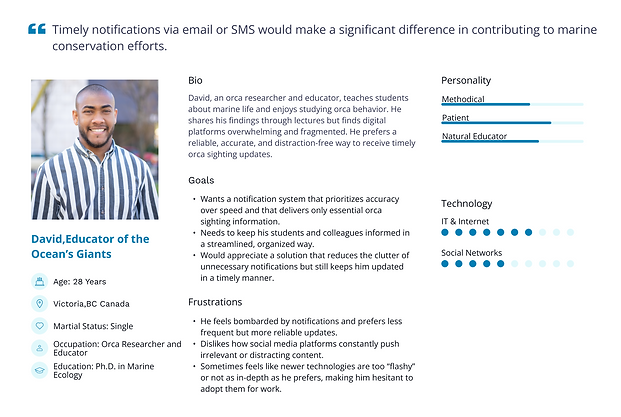
A Day in the Life: Dr. Emily Carter’s Notification Journey
I created a user journey map for Dr. Emily Carter to visualize the steps she takes, her emotions, pain points, and opportunities for improvement. This journey helped identify key areas where the experience could be enhanced, ensuring a more seamless interaction with the product.

Affinity Mapping: Turning User Understanding into Actionable Insights
After defining user personas and mapping out their journey, I synthesized all user research data using affinity mapping. I gathered observations, quotes, and feedback from interviews and surveys, then grouped similar ideas into themes.


Key Findings
-
Users preferred SMS over push notifications.
-
Users wanted real-time alerts for live listening events.
-
SMS notifications should support conservation efforts with donation reminders.
-
Personalized messages based on user involvement were essential.
-
Opt-in/opt-out options must be clear and simple.
This research phase laid the foundation for creating a user-centered SMS notification system tailored to users' needs.
Ideation & Conceptualization
Building research into design
After analyzing research findings, clear themes emerged about what users truly needed from an SMS-based notification system.

Problem
Users struggle with slow, uncustomized notifications about orca sightings, and existing channels don't offer real-time, customizable updates.

Opportunity
Design an SMS notification system that delivers instant, personalized updates with flexible preferences, improving engagement and supporting conservation efforts.
Defining the SMS System: Core Features & User Flow
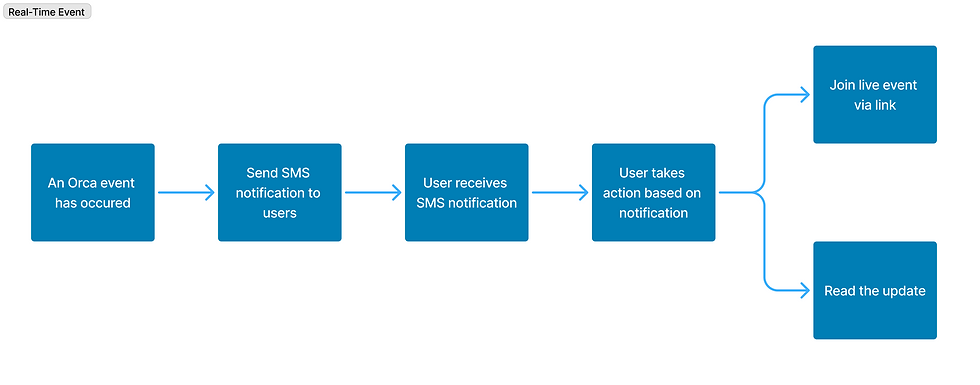
I focused on defining user flows, which are visual representations of the user's steps within the system. These flows outlined the user’s journey from opt-in to receiving notifications, helping ensure a streamlined experience.
Scenario 1-Real-Time Event Flow
The Real-Time Event Flow is the heart of the SMS notification system, designed to deliver immediate and time-sensitive information to users. These alerts are meant to notify users about orca sightings, live events, or other urgent updates from Orcasound.
Example Message: “Orca sighting alert! A pod of orcas spotted near San Juan, Join the live listening event here: [link].”
Scenario 2-Opt-in and Sets Preferences for SMS Notification for Signtings
The Opt-In Flow has been designed to make subscribing to SMS notifications simple and user-friendly. Users needed a clear and easy way to agree to receive updates without any confusion.
Example Message: “Welcome to Orcasound! Get real-time alerts on orca sightings and live events. Reply 'YES' to subscribe.”

Scenario 3-Opt-out for SMS Notification
The Opt-Out Flow allows users to unsubscribe from SMS notifications whenever they choose easily. Providing a straightforward opt-out process is essential for user autonomy, ensuring that they feel in control of their engagement with Orcasound.
Example Message: “You’ve unsubscribed from Orcasound alerts. We’re sorry to see you go. Reply ‘YES’ to resubscribe.”

Scenario 4-Donation Reminder
The Donation Reminder Flow was crafted to support Orcasound’s conservation goals by gently encouraging users to donate to their efforts. Personalization was key in this flow—messages were tailored to users based on their past actions and engagement with Orcasound.
Example Message: “Thank you for your past support! You helped protect orcas. Join us again today by donating”

Mid to High Fidelity Wireframes
Design decisions
Next, I created Mid-fidelity wireframes to visualize how the SMS notifications would appear on a user’s phone. The wireframes focused on the content structure and how each notification would be presented, ensuring that the information was clear and concise. These wireframes helped me make design decisions that would best meet user needs and Orcasound’s goals. The choices were informed by user research, technical limitations (like SMS character limits), and the desire to keep the system simple yet effective.
1. SMS as the Primary Communication Channel
I chose SMS as the communication channel because it is widely accessible and doesn’t rely on internet access. Orcasound’s users may be in remote areas, and SMS ensures real-time notifications reach everyone.
2. Easy Opt-In/Opt-Out Process
The opt-in process is simple, with users texting a short code to subscribe and replying “STOP” to unsubscribe.


3. Clear Messaging & Donation Reminders
With the 160-character limit in SMS, I made sure the messages were short and clear, including key details like the sighting location and link. Donation reminders were added in a way that didn’t overwhelm users, spaced out to gently encourage support without interrupting the experience.

High-Fidelity Wireframes: Visualizing the SMS Experience
I didn’t create a fully interactive design, but I did take my mid-fidelity wireframes and make them look cleaner and more polished. This helped me organize the layout better, highlight key information, and clearly show how users would move through the system. These updated wireframes made my design ideas easier to understand and share.
Design 1: Event Alert with Time, Location, and Call-to-Action

Location icon and a bolded title to grab attention.
Clickable link for more info or live stream access.
Donation prompt to support Orcasound directly from the message.
Design 2: Live Listening & Opt-Out Options
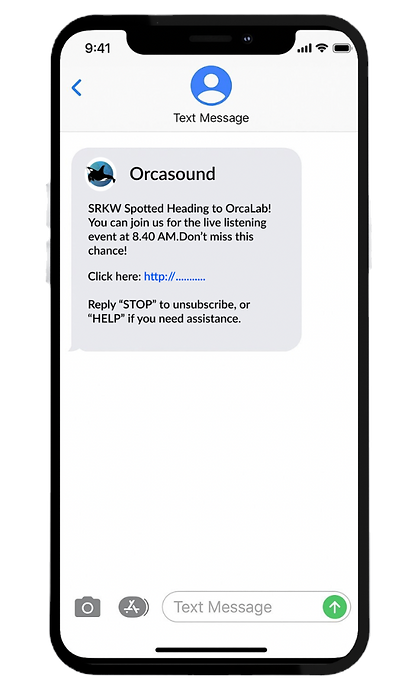
Personalized header with Orcasound’s icon to reinforce trust and branding.
A brief and enthusiastic call-to-action to join the event.
Clear unsubscribe/help instruction improves transparency and user control.
Project Takeaways
Working on Orcasound’s SMS notification system wasn’t just about creating a feature—it was about solving a real-time communication challenge for a passionate community of ocean lovers, researchers, and conservationists.
What I Learned
1. Early research uncovered that users weren’t just frustrated — they were missing critical real-time updates. This insight became the project's heartbeat, shaping every decision from ideation to wireframes.
2. SMS is not a flashy solution — but it’s fast, reliable, and accessible. By focusing on real-time alerts, location filtering, and clear opt-in/outflows, the system became something users could trust and rely on.
3. Creating Emily’s persona and journey map helped personalize the experience. Her story ensured that each feature served a purpose — not just for convenience, but to support her work as a marine biologist.
4. Working with low-fidelity wireframes and flows taught me that good UX doesn’t always need hi-fi visuals. A well-articulated process and thoughtful structure can communicate just as powerfully.
5. Without a development team or full testing, I had to be resourceful — using sketches, affinity mapping, and storytelling to bring the solution to life. It reminded me that great UX doesn’t require perfect tools — just clear thinking.
What’s Next
-
To test real interactions, including how users subscribe, manage preferences, and respond to alerts.
-
Validate the end-to-end SMS experience with real users to spot friction points and unexpected behaviors.
-
Partner with a development team to explore technical feasibility, automation of alerts, and user data protection.
-
Explore accessibility considerations — such as screen reader compatibility for visually impaired users — and multilingual support for wider reach.
Final Reflection
This project challenged me to step into both the shoes of a UX researcher and a designer, balancing user needs, technical simplicity, and product vision. More than designing screens, it was about designing trust — in the speed, relevance, and reliability of each alert.
It reinforced that great design is not about more features, but about solving the right problem with clarity, empathy, and intent.
Other Projects

Enhancing digital experiences through research-driven design decisions.